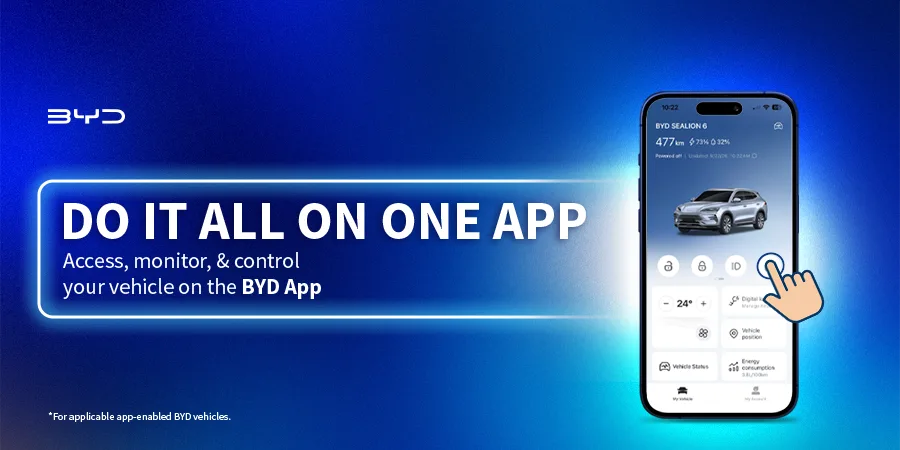
Getting ready for a drive can start before you reach your car. Whether you want to check your battery level, cool the cabin on a warm afternoon, or make sure the doors are locked, the BYD App brings useful vehicle functions to your smartphone.
Designed to keep owners connected to their vehicles, the app combines remote controls and vehicle information in one convenient place. It gives you an easier way to check on your BYD and prepare for your next journey, even when you’re away from the driver’s seat.
Here’s what to know about accessing the app, getting started, and making its features part of your everyday routine.
Who Can Use the BYD App?
The BYD App’s connected vehicle features are intended for owners of compatible BYD vehicles. To access these functions, you’ll need a supported smartphone, a registered account linked to your vehicle, and activated vehicle connected services.
Your authorized BYD dealer can help confirm compatibility and check that your vehicle and registered email address are correctly set up for activation. Downloading the app is one part of the process; the vehicle’s connected services also need to be enabled.
Where the app’s Authorization feature is supported, the owner can also grant access to other users, such as a family member who regularly drives the vehicle. Available permissions depend on the functions supported by your vehicle and app.
How to Activate the BYD App
Getting started involves setting up your vehicle’s connected services and registering your app account. Screen labels and pairing instructions may differ depending on your vehicle and software version.
1. Confirm Activation With Your BYD Dealer
Ask your authorized BYD dealer to confirm that your vehicle supports the app and that its connected-service activation has been completed.
Check that the email address recorded by your dealer is correct and accessible. You’ll need this address when registering your account.
2. Download the Official App
Download the official app from the Apple App Store or Google Play.
3. Select the Correct Country or Region
Check the country or region selected in the app. For a vehicle purchased in the Philippines, select Philippines.
The default selection may follow your phone’s settings, so it’s worth checking this before continuing. An incorrect region can prevent your vehicle information from appearing.
4. Register and Verify Your Account
Open the app and select Sign up or Register, then follow the prompts:
- Enter the email address registered with your authorized BYD dealer.
- Request an email verification code.
- Retrieve the code from your inbox and enter it in the app.
- Set your account password and complete registration.
5. Confirm Your Vehicle Is Connected
After signing in, check whether your vehicle appears in the app.
If prompted to add or pair your vehicle, follow the onscreen instructions. Depending on the setup, this may involve using the app to scan a QR code displayed on the vehicle’s infotainment screen. Your dealer can help if the vehicle does not appear or the pairing process cannot be completed.
6. Set Up Remote Control Verification
The app may prompt you to create an operation password when you first use a remote function, such as locking or unlocking the doors. Follow the instructions to complete this verification.
For internet-based remote controls to work, both your phone and vehicle need an internet connection. Once setup is complete, check that the app displays your vehicle information and responds to an available control.
Key Features That Make Everyday Ownership Easier
Available functions depend on your BYD model, vehicle equipment, software version, and locally enabled services.
Check Your Battery Level and Remaining Range
The app lets you view your vehicle’s battery charge level and remaining driving range. Charging status is also available on supported vehicles.
This makes it easier to fit charging into your day. You can check your battery while getting ready for work or review charging progress without returning to the car each time.
Prepare a More Comfortable Cabin
Remote air-conditioning controls let you turn on the A/C before entering your vehicle. On a warm afternoon, that means you can start cooling the cabin even before you reach your car.
Where supported and equipped, the app also provides controls for seat ventilation or heating, helping you prepare a more comfortable seat before departure.
Check and Control Your Door Locks
If you want to check on your vehicle after parking, the app gives you access to supported lock-status information and remote locking or unlocking functions.
You can also check whether doors and windows are closed, helping you confirm your vehicle’s condition from your phone.
Keep Track of Tire Pressure
The app allows you to check your vehicle’s tire pressure, which can help you notice when a tire needs attention before your next drive. It’s especially useful when preparing for a longer trip or checking the vehicle after it has been parked.
Find Your Parked BYD More Easily
In a busy parking area, similar-looking rows can make finding your car take longer than expected.
The app’s supported vehicle-finding controls let you flash the lights or sound the horn to help identify your BYD. It’s a useful convenience after shopping, attending an event, or returning to an unfamiliar parking space.
Need Help Getting Connected?
If your verification code does not arrive, check your spam or junk folder. If your vehicle is missing from the app, ask your dealer to verify the registered email address and connected-service activation status.
For local assistance, contact your authorized BYD dealer or the BYD Contact Center at (02) 7758 1888.
Make the BYD App Part of Your Daily Drive
From checking your battery before breakfast to preparing a cooler cabin before heading home, the BYD App helps make everyday ownership more convenient.
Download the official app and speak with your authorized BYD dealer to get connected and explore the features available for your vehicle.
The BYD App is available only for app-enabled BYD vehicle models. Feature availability and activation procedures may vary by model, variant, vehicle equipment, software version, mobile device, and local connected-service availability.